
My Complete Capture System
How I Never Lose an Idea Again


The average person has thousands of thoughts a day. Almost all of them disappear without a trace.
That’s fine if your work doesn’t rely on ideas. If it does, forgetting them isn’t a minor inconvenience; it’s silent value loss.
After my stroke, one of my biggest fears wasn’t physical. It was cognitive. The feeling that a good idea could arrive, quietly matter, then disappear before I had the energy to act on it scared me.
This is part of my Four Hour Setup series; an honest look at how I work in short, focused bursts without relying on memory, motivation, or perfect days. This edition is about my capture system; the safety net that means ideas don’t need me to be “on” to earn a living.
Why Capture Is the Foundation of Creative Work
For creators and writers, capture isn’t a nice-to-have. It’s the work before the work.
Every article, newsletter, or post starts as a fragile thing; a half-formed thought, a stat you stumble across, a line you hear on a podcast, or an idea that arrives mid-walk. If you don’t catch it immediately, it’s gone.
Memory isn’t just unreliable; it’s fast-moving. You might remember the idea but forget where you saw it, or remember the stat but lose the context. Within hours, its usefulness decays.
That’s why capture speed matters more than organisation at this stage. The job is to preserve the spark, not to polish it.
A single good stat can carry an entire article. An offhand comment on a podcast can unlock a new angle. At the very least, they add weight and credibility; gravitas that turns opinion into something sturdier.
When capture works, writing stops feeling like invention and starts feeling like assembly. You’re selecting from things you already noticed.
That’s the leverage. And it’s why capture sits at the foundation of everything else I do.
What It Is + Why I Use It
At its core, my capture system solves one problem: ideas don’t arrive when you’re ready.
They show up mid-walk, halfway through a podcast, partway through an article, or when your brain is already tired. Before this setup, I trusted my head far too much. I assumed I’d remember the good stuff. I didn’t.
Post-stroke, that became a liability. I needed something kinder; a system that worked even on low-capacity days and didn’t punish me for being human.
I’ve tried sprawling Notion setups, Apple Notes chaos, bookmarking things “to read later” and never returning. What made this system stick isn’t the tools themselves; it’s that it’s friction-light, energy-aware, and honest. If something isn’t captured easily, it’s lost. So simplicity matters more than flexibility.
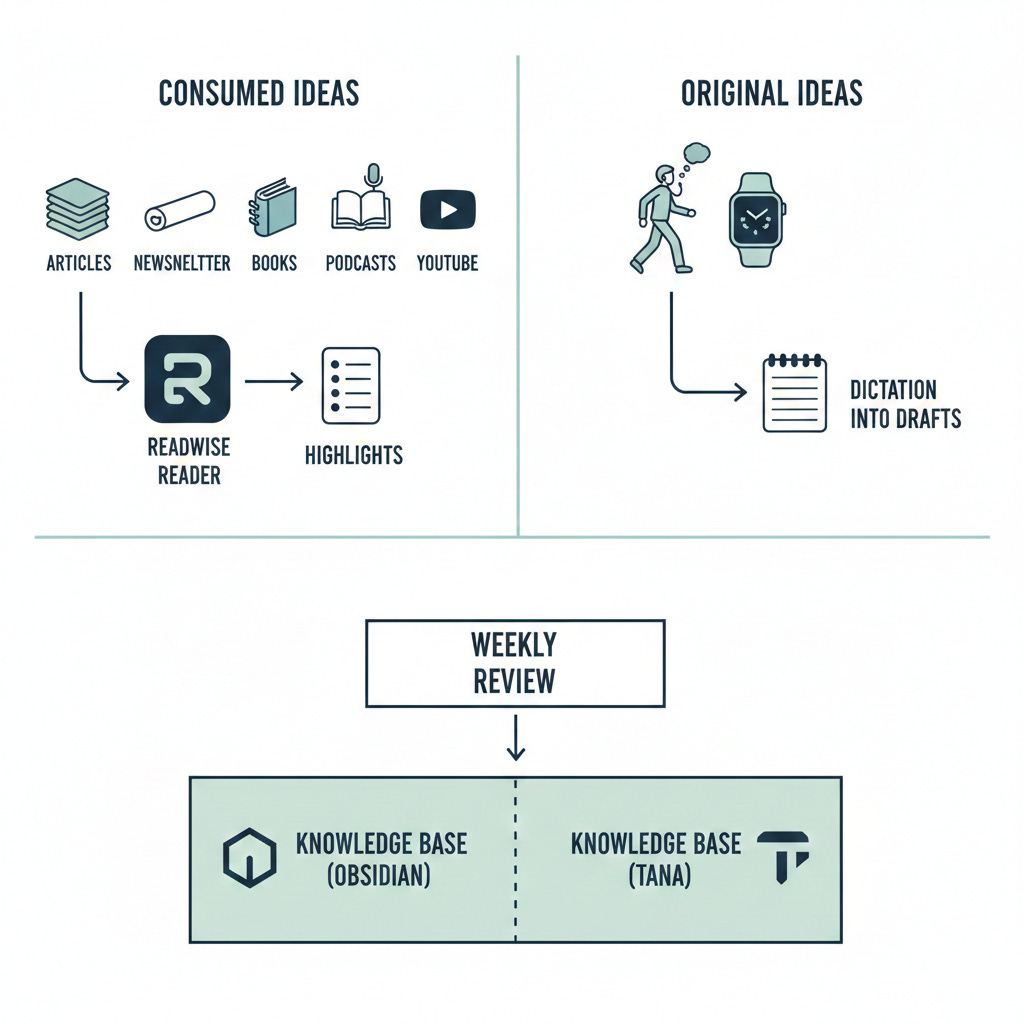
The System, At a Glance
How I’ve Set It Up
I think about capture in three layers: incoming, processing, and transfer.
There are also two different kinds of ideas in my world, and they arrive in different ways.
The first are ideas influenced by what I consume; articles, newsletters, books, podcasts, YouTube videos. These flow through Readwise Reader.
The second are original thoughts; ideas that surface while walking or listening, usually when my brain is relaxed and offline. Those never touch Reader. They go straight into Drafts via my Apple Watch.
Treating these as separate streams was a turning point. Trying to force everything through one inbox created friction. Splitting them reduced it.
Incoming must be effortless. Processing is deliberate. Home must be calm.
Capture First, Decide Later
At the moment of capture, I make exactly one decision: does this interest me?
I don’t think about how a stat should be categorised, where it should live, or how I might use it in future. That thinking costs energy, and energy is limited.
If something catches my attention, it gets captured. Full stop.
What it’s for can wait. Whether it becomes an article, a paragraph, a quote, or nothing at all is a decision for later, calmer sessions.
This single rule removes friction and dramatically increases capture quality.
Reader: Ideas Sparked by What I Consume
Readwise Reader is where ideas influenced by external content arrive.
Articles, newsletters, PDFs, YouTube transcripts, and saved podcast notes; anything I didn’t create myself starts here. I don’t take notes in the traditional sense. I highlight moments that make me pause, disagree, or want to explore something further.
Those highlights sync automatically into my review queue. I don’t rush to interpret them.
A good example: I highlighted research suggesting that walking significantly improves creative idea generation. I didn’t act on it. A few days later, during my weekly review, it still felt interesting. That’s when it earned its place, and eventually became the spine of this article.
That delay is doing important work.
Walking and Listening Ideas: Captured Instantly
Original ideas behave differently. They usually arrive when I’m walking, or when I’m listening to a podcast with half my attention on the world rather than a screen.
For these, speed matters more than structure.
I dictate straight into the Drafts app on my Apple Watch. One tap, speak the thought, done. No screen, no typing, no breaking stride.
These notes are rough. That’s intentional. The goal isn’t clarity; it’s survival. If I try to remember the idea properly or clean it up later in my head, it disappears.
Later, during a review session, I decide whether it’s worth keeping. Most aren’t. That’s fine.
Capture does not equal commitment.
Time as a Filter
Time is one of the most underrated tools in any capture system.
Each week, I review the ideas, stats, and thoughts I’ve captured. If something still feels interesting after a few days, it passes the first test.
Only then does it get rewritten properly and moved into my knowledge base.
If it no longer captivates me, it gets deleted without ceremony.
This keeps my PKM lean. Not everything deserves to be stored forever. Only the ideas that survive time do.

The Knowledge Base: One Home, Not a Shrine
Right now, Obsidian is where ideas grow up.
It’s where both streams converge: highlights from Reader and rewritten thoughts from Drafts. I use it for long-form notes, writing, weekly reviews, and connecting ideas over time.
I’m also actively testing Tana as a potential replacement. The reason is simple: I want fewer tools, not more power. If I can capture, review, and develop ideas in one calmer system, I will.
This article will still be true if the tool changes. That’s deliberate.
The rule is one home. Which app earns that role is secondary.
My Rules for What Lives in my PKM
Every note must earn its place (I would estimate that over 75% of my captured notes and ideas don’t make it into my PKM).
It has to link to a role I play, like Writer or Founder.
It has to link to a theme or interest I’m actively exploring.
If it can’t do both, it doesn’t belong long-term.
Often ideas sit untouched for a few days before promotion. That delay filters novelty and keeps the system meaningful rather than busy.
This is why I’m rarely starting from zero when I write. I’m not inventing ideas - I’m developing ones that survived contact with time.
Who This Is For (and Who It Isn’t)
This system is for people whose best ideas arrive away from the desk, and who don’t have the energy to capture everything perfectly.
It’s for writers, founders, and creatives who want ideas to survive bad days, not just productive ones.
It’s not for people who enjoy complex databases, daily note gardening, or treating tools as a hobby.
Quick Capture, By Design
Two principles underpin everything.
Capture must take less than five seconds.
Capture must work when I’m tired, distracted, or walking.
The Apple Watch solves this. So does Reader’s highlighting. Designing for laziness isn’t a flaw; it’s the point.
My Favourite Features or Habits
Text-to-speech in Reader so I can “read” while walking
Highlighting YouTube transcripts instead of taking notes
Dictating walking and newsletter ideas into Drafts via my Watch
Weekly reviews that filter ruthlessly
One calm knowledge base, not multiple inboxes
Each of these protects energy. That’s the real win.
What I’d Improve
Processing still takes time. On very low-energy weeks, things can pile up.
The temptation to add new tools never fully goes away. Staying streamlined requires saying no more often than yes. This is an on-going battle!
Try It Yourself
If you’ve ever felt anxious about forgetting good ideas, or guilty about unread bookmarks, this kind of system helps more than you’d expect.
You don’t need my tools. Start with one capture method you’ll actually use, and a regular review habit that lets time do some of the work for you.
If you want to try Readwise Reader, sign up here. I get a small kickback which helps keep Four Hour Freedom running and you’ll get twice the standard free trial period to try it out for yourself.
This system didn’t make me more creative. It made creativity safer.
Ideas no longer depend on my energy, my memory, or the day being a good one.
The tools may change. The principles won’t.
If you found this article useful, I’d love it if you subscribed to the newsletter - where we’re building businesses that value independence over endless hustle.
Failing that, you can Buy me a coffee (I hugely appreciate it!) or follow me socially on: Bluesky | Substack | Instagram