
Why Notion Is My Command Centre (And Not My Second Brain)
How separating thinking from managing helped me rebuild a calm, focused business in just four hours a day.


When I first came across Notion, I treated it like every other shiny new app - something to play with, not build my business around. I was a bit of a magpie when it came to tech, always chasing the next tool that might make life easier.
Fast forward a few years, and Notion has quietly become the beating heart of my business — not because it’s trendy, but because it gives me control. These days, it’s my command centre. It’s not where I think, it’s where I decide.
This edition of Four Hour Setup is about that difference: how I use Notion to run my business in four hours a day - and why I leave the actual thinking to other tools.
Who This Is For
If you’re a solo founder, freelancer, or recovering overthinker trying to rebuild structure without burning out, this is for you.
Maybe you’ve been juggling too many tools, or your task list has turned into a black hole. You don’t need another productivity app - you need a command centre. Somewhere that brings everything together and helps you focus on what actually moves the needle.
What It Is + Why I Use It
Notion is where I manage the operations side of my business. It’s my digital control room - a single dashboard that shows me exactly what needs doing, what’s coming next, and how things are performing.
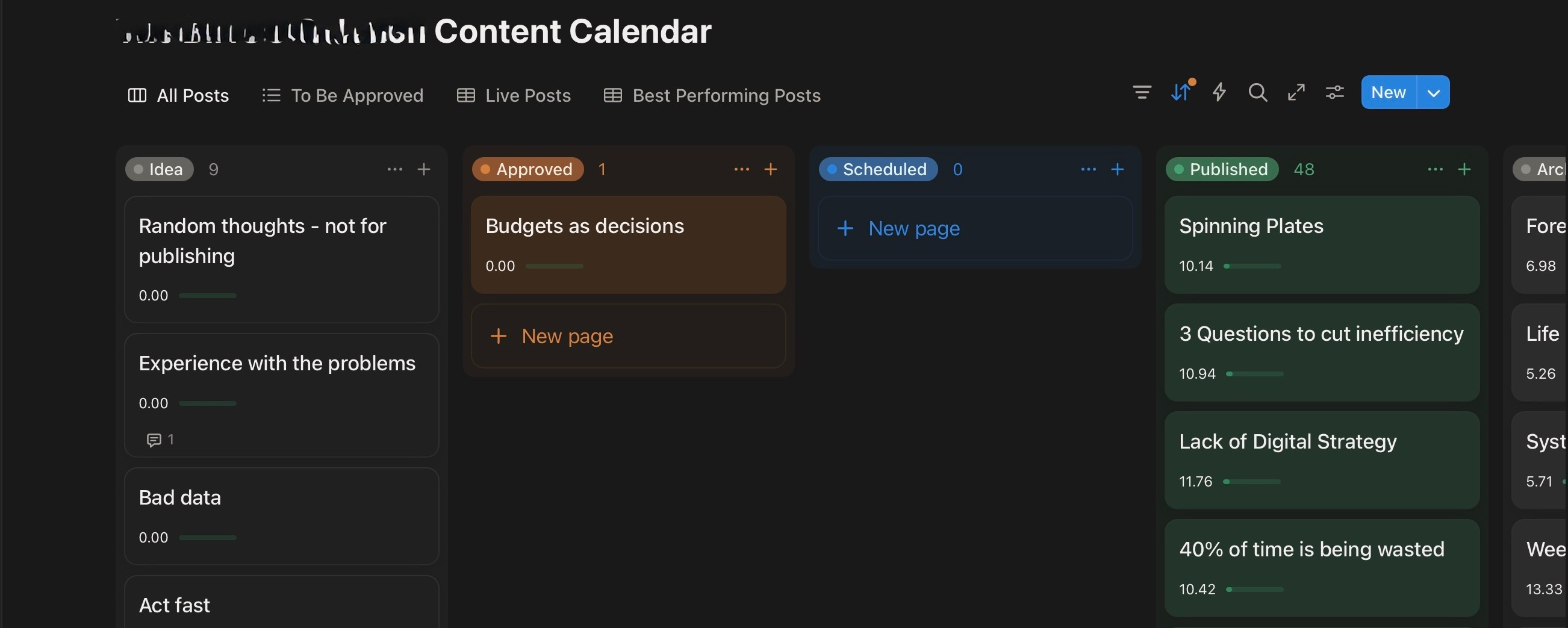
Two years ago, I started using it properly for client work - mainly to manage content calendars. That grew into invoice tracking, affiliate databases, and public-facing sales documents. Over time, it became the backbone of my working day.
Before that, everything was scattered across Google Sheets, notes, and emails. Notion’s real magic was its databases - being able to pull data from multiple sources into one place. That wasn’t possible anywhere else.
It’s not the kind of tool that shouts about its power; it just quietly organises your life in the background.
How I’ve Set It Up
My workspace is built around roles, not projects.
Each role (Writer, Business Owner, Creator, Health Manager) has its own page. Inside, I link databases for tasks, goals, invoices, or metrics, depending on what that role needs.
My day starts in Notion. The first thing I open every morning is my Planning Dashboard. It shows:
Today’s priorities
The week’s focus
My latest invoices and revenue
Content projects in progress
This reduces decision fatigue and keeps my energy focused on the right things — something that’s become essential since my stroke.
Here’s what else lives inside my Notion:
Quarterly Goals: Tied to weekly reviews, so I can see progress without losing the bigger picture.
Client Area: Custom dashboards for each client, with shared calendars and deliverables.
Affiliate Tracker: Records campaigns, partners, and payments in one view.
Content Hub: Plans out every Four Hour Freedom newsletter and YouTube video.
I keep the design clean. No fancy icons or overcomplicated formulas — just clarity.
My Favourite Features or Habits
Linked Databases – Everything connects, but nothing duplicates.
Daily Dashboard – Opens automatically each morning. A five-minute glance gives me the plan for the day.
Quarterly Reviews – Combines business and personal goals with real data — financials, health, growth.
Shared Calendars – Clients love the visual overview compared to a messy Google Sheet.
Tidy Tuesdays – Once a week I do a quick cleanup. It takes five minutes and stops chaos creeping in.
These small rituals keep the system alive.
A Quick-Start Workflow for Beginners
If you’re new to Notion and want to build your own command centre, start simple.
Create a “Home” page. This will be your daily dashboard.
Add three databases: Tasks, Projects, and Goals.
Link them together. Each task connects to a project, and each project connects to a goal.
Add a “Today” filter. Show only what’s due today or this week.
Review weekly. Every Friday, clear completed tasks and check progress.
That’s all you need to begin. The beauty of Notion is that it can grow with you, not overwhelm you.
What I Don’t Use It For
This is where most people trip up.
I don’t use Notion for personal thinking, journaling, or writing. That all happens in Obsidian — my true second brain. Obsidian handles long-form writing, reflections, book notes, and creative ideas far better. It’s fast, private, and built for thinking.
Notion, on the other hand, is built for management. It’s structured and visual - perfect for logistics, not imagination.
Here’s how I separate them:
Obsidian: Thinking, writing, reflecting due to files being stored locally, ease of long-form writing and the fact that it is markdown-based
Notion: Planning, tracking, managing due to its visual dashboards, relational databases and client-friendly UI.
Knowing this difference was a turning point for me. I stopped fighting the tools and started using them for what they were actually good at.
The Philosophy Behind It
Even if Notion vanished tomorrow, the principle would still hold:
Separate the place where you think from the place where you manage.
When you try to do both in one app, you create noise. Thinking needs space. Managing needs structure. Keeping those worlds apart protects your creativity and reduces cognitive load - especially if, like me, your energy has limits.
The tools may change over time, but the philosophy doesn’t.
What I’d Improve
If I could fix one thing, it’d be offline performance. I often take my iPad Pro out on walks for rehab, and Notion can be slow to sync. Otherwise, it’s everything I try to be in my work - functional, calm, and dependable!
The Payoff
Today, Notion gives me calm focus. I can see what I’m doing and how my business is performing in just a few clicks. It’s taken the chaos out of working with limited time and energy.
And honestly, it makes me look more professional. Sharing a clean Notion dashboard with clients feels far better than sending a cluttered Google Sheet. It’s small details like that which build trust — and make me proud of the systems I’ve built.
Try It Yourself
If your work feels scattered, start small. Use Notion for structure, not storage.
Let it be your command centre - a place to plan, track, and steer your work and give your ideas somewhere else to breathe.
Final thoughts
Notion keeps me steady. Obsidian keeps me thinking. Together, they’ve made it possible for me to run a calm, focused business in just four hours a day.
See you next week,
Simon
If you found this article useful, I’d love it if you subscribed to the newsletter - where we’re building businesses that value independence over endless hustle.
Failing that, you can Buy me a coffee (I hugely appreciate it!) or follow me socially on: Bluesky | Substack | Instagram